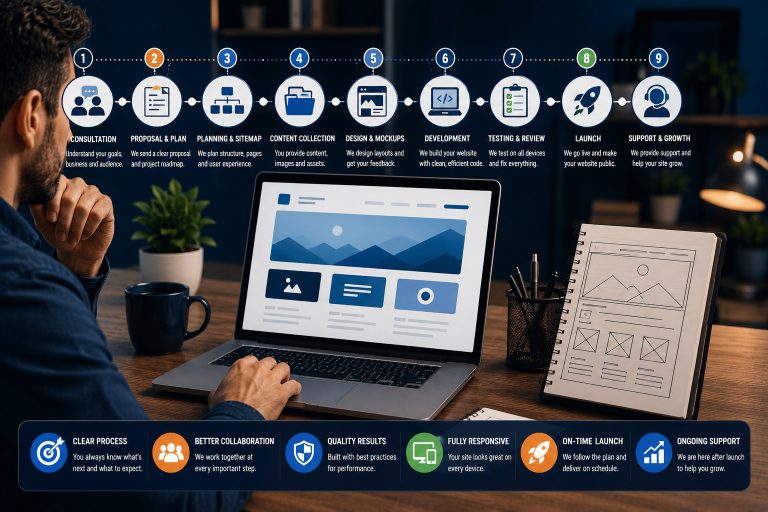

Knowing what clients should prepare before hiring a website designer can make the project smoother, faster and more successful. A website designer can help with strategy, layout, structure and technical setup, but the best results happen when the client also provides the right information before the project begins.
Many website delays happen because important details are missing. These may include business goals, page content, brand assets, login access, product information, service descriptions, images, domain details or examples of websites the client likes.
Preparation does not mean you need to know everything about website design. It simply means you should understand your business, your audience, your offer and the basic materials the designer needs to build a clear and professional website.
This guide explains the key things clients should prepare before hiring a website designer so the project can start with clarity and avoid unnecessary back-and-forth.
Quick answer
Before hiring a website designer, clients should prepare their business goals, target audience, page list, written content, logo, brand colours, images, service or product details, domain and hosting access, website examples, required features, budget, timeline and decision-maker information. These details help the designer plan the website properly and complete the project with fewer delays.
You do not need everything to be perfect
A good website designer can help refine your ideas, but having your main business details, content direction and access information ready will make the project much easier.
Why Preparation Matters Before Hiring a Website Designer
A website project is not only about design. It involves understanding the business, planning the pages, organising content, setting up technical tools and creating a user experience that supports the company’s goals.
When a client is prepared, the designer can work faster and make better decisions.
Preparation helps with:
- Clearer project scope
- Better design direction
- Faster content placement
- Fewer revisions
- More accurate pricing
- Smoother communication
- Better SEO planning
- Improved launch readiness
Without preparation, the designer may need to pause repeatedly to request missing details, which can delay the website launch.
1. Prepare Your Business Goals
Before hiring a website designer, know what you want the website to achieve.
Common website goals include:
- Generate enquiries
- Sell products online
- Book appointments
- Promote services
- Build brand credibility
- Share educational content
- Collect email subscribers
- Support existing customers
- Launch an online course
- Show a portfolio
Your goal affects the layout, content, call to action, page structure and features needed on the website.
Example
A coaching website may need booking forms, testimonials and programme pages. An ecommerce website may need product categories, payment setup, shipping settings and policies. A service business may need clear service pages, contact forms and strong calls to action.
2. Prepare Your Target Audience
Your website should be built for the people you want to attract.
Think about:
- Who your ideal customers are
- What problem they want solved
- What they need to trust your business
- What questions they ask before buying
- What objections they may have
- What action you want them to take
The more the designer understands your audience, the easier it is to create pages that speak directly to them.
3. Prepare Your Website Page List
A page list helps define the structure of the website.
Common pages include:
- Home
- About
- Services
- Individual service pages
- Products
- Portfolio
- Testimonials
- Blog
- FAQs
- Contact
- Privacy Policy
- Terms and Conditions
Why the page list matters
The page list affects the project cost, timeline, menu structure, content needs and design workload.
If you are not sure what pages you need, prepare your main services and business goals. The designer can recommend a proper structure.
4. Prepare Your Website Content
Content is one of the biggest causes of website project delays.
Useful content to prepare:
- Business description
- About section
- Service descriptions
- Product descriptions
- FAQs
- Testimonials
- Team bios
- Contact details
- Call-to-action text
- Policy information
Content does not need to be perfect
You can provide rough notes, bullet points or old website content. A designer or copywriter can help improve the wording, but they need the correct business information from you.
5. Prepare Your Brand Assets
Brand assets help the designer keep the website consistent with your business identity.
Prepare:
- Logo files
- Brand colours
- Fonts if available
- Brand guide if available
- Preferred style or tone
- Tagline or slogan
- Business name format
Best logo file formats
If possible, provide high-quality logo files such as SVG, PNG or PDF. Avoid screenshots of logos because they may look blurry on the website.
6. Prepare Photos, Videos and Graphics
Good visuals make a website look more professional and trustworthy.
Useful visuals include:
- Professional photos
- Team photos
- Office or workspace images
- Product photos
- Project images
- Portfolio screenshots
- Video content
- Icons or illustrations
Image quality matters
Use clear, high-resolution images where possible. Blurry or stretched images can make a professional website look less credible.
If you do not have images, tell the designer early so they can suggest stock photos, custom graphics or an image direction.
7. Prepare Service or Product Details
Your designer needs to understand what you sell.
For service businesses, prepare:
- Service names
- Service descriptions
- Who each service is for
- Benefits
- Process steps
- Pricing if you want it displayed
- FAQs
- Booking or enquiry process
For ecommerce businesses, prepare:
- Product names
- Product descriptions
- Product images
- Prices
- Categories
- Shipping information
- Return policy
- Payment methods
- Product variations
Clear product and service details help the designer create pages that are easier for customers to understand.
8. Prepare Required Website Features
Make a list of the features your website needs.
Common website features include:
- Contact forms
- Booking calendar
- Online payments
- Live chat
- Newsletter signup
- Blog
- Testimonials section
- Portfolio gallery
- Membership area
- Online course area
- Downloadable resources
- Search function
- Multilingual support
- CRM integration
Separate must-haves from nice-to-haves
This helps control cost and timeline. Some features can be added in phase two after the first website version is launched.
9. Prepare Domain and Hosting Access
The designer may need access to your domain, hosting or website platform.
You may need access to:
- Domain registrar
- Hosting account
- WordPress admin
- Website builder account
- Email hosting
- DNS settings
- SSL settings
- Payment gateway
- Analytics tools
Do not send passwords carelessly
Use secure sharing methods where possible. You can create temporary admin access, invite the designer as a user or use a password manager.
10. Prepare Website Examples and Inspiration
Website examples help the designer understand your taste and expectations.
Share examples of:
- Websites you like
- Websites you dislike
- Competitor websites
- Layout styles you prefer
- Colour styles you like
- Navigation examples
- Feature examples
Explain what you like
Do not only send links. Tell the designer what you like about each example, such as the colours, layout, menu, service section, booking flow or overall feel.
11. Prepare SEO and Marketing Details
If you want the website to support search visibility and marketing, prepare basic SEO information.
Useful SEO details include:
- Main services
- Target locations if relevant
- Target audience
- Important keywords
- Competitor websites
- Existing blog posts
- Google Business Profile access
- Google Analytics or Search Console access
SEO should be considered during the website structure, not only after the design is finished.
12. Prepare Your Budget and Timeline
Budget and timeline help the designer recommend the right solution.
Be clear about:
- Your launch deadline
- Your available budget
- Must-have features
- Future features
- Content readiness
- Approval process
Why this matters
A simple five-page website and a custom ecommerce website do not require the same budget or timeline. Being clear early helps avoid mismatch between expectations and scope.
13. Prepare the Decision-Maker and Communication Process
Website projects become slower when too many people are giving conflicting feedback.
Clarify:
- Who approves the design
- Who provides content
- Who gives feedback
- How feedback should be sent
- How quickly approvals can happen
- Who has access to accounts
A clear communication process helps the project move faster and avoids confusion.
Common Mistakes Clients Should Avoid
- Hiring a designer without clear goals
- Starting without content direction
- Not knowing the required pages
- Providing low-quality logo files
- Sending blurry images
- Changing the scope repeatedly
- Delaying feedback
- Not preparing website access
- Copying a competitor too closely
- Expecting SEO results without SEO planning
- Choosing based only on price
- Not agreeing on timeline and deliverables
Client Preparation Checklist Before Hiring a Website Designer
Business and content
- Business goals are clear
- Target audience is defined
- Page list is prepared
- Service or product details are ready
- About information is available
- Testimonials are collected
- FAQs are prepared
- Contact details are confirmed
Assets and access
- Logo files are ready
- Brand colours are available
- Images are prepared
- Domain access is available
- Hosting access is available
- Platform login is available
- Website examples are collected
- Budget and timeline are clear
Final Verdict: What Clients Should Prepare Before Hiring a Website Designer
Understanding what clients should prepare before hiring a website designer helps you avoid delays, reduce confusion and get a better final website.
You do not need to know how to design the website yourself. That is the designer’s job. However, you should prepare your business goals, page list, content direction, brand assets, images, website access, feature requirements, budget and timeline.
The more clarity you provide at the beginning, the easier it is for the designer to create a website that looks professional, supports your goals and speaks to the right audience.
Our recommendation
Before contacting a website designer, prepare a simple project document with your goals, pages, content notes, examples, assets, access details and timeline. It does not need to be perfect, but it should give the designer a strong starting point.
Frequently Asked Questions
What should clients prepare before hiring a website designer?
Clients should prepare their business goals, target audience, page list, content, logo, images, service details, website features, domain access, hosting access, examples, budget and timeline.
Do I need to write all website content before hiring a designer?
Not always, but you should prepare at least rough notes about your business, services, audience and key messages.
Can a website designer help with content?
Many designers can help structure or improve content, while some may also offer copywriting or work with a copywriter.
What logo format should I send to a website designer?
Send high-quality logo files such as SVG, PNG, PDF or AI if available. Avoid screenshots because they may appear blurry.
Do I need hosting before hiring a website designer?
Not always. Some designers can recommend hosting based on your website needs, but you should know whether you already have hosting.
Should I send competitor websites to my designer?
Yes. Competitor examples can help the designer understand your industry, but your website should still have its own unique structure and message.
How many website examples should I send?
Three to five examples are usually enough. Explain what you like or dislike about each one.
Should I know my website budget before contacting a designer?
Yes. A budget helps the designer recommend the right solution and avoid suggesting features that are not realistic for the project.
What access will my website designer need?
They may need access to your domain, hosting, WordPress dashboard, website builder, DNS settings, email hosting, analytics or payment tools.
How can I share passwords safely with a website designer?
Use temporary admin accounts, user invitations or a secure password manager instead of sending passwords through plain messages.
Do I need professional photos for my website?
Professional photos are helpful, but not always required. If you do not have photos, the designer can suggest stock images, graphics or a visual direction.
What causes website projects to delay?
Common causes include missing content, unclear feedback, delayed approvals, missing access, changing scope and lack of clear goals.
Can I start a website project without knowing all the pages?
Yes, but you should at least know your main services, goals and audience. The designer can help recommend the final page structure.
Should SEO be discussed before the website is designed?
Yes. SEO should influence page structure, headings, URLs, content planning and internal linking from the beginning.
What is the best way to prepare for a website design consultation?
Create a simple document with your goals, audience, pages, content notes, brand assets, examples, required features, access details, budget and timeline.
Ready to Start Your Website Project?
Teemikemedia Agency can help you plan, design and build a professional website that supports your business goals and gives your customers a clear path to contact you.