
A professional website redesign can help your business look more credible, communicate more clearly, and turn more visitors into leads or customers. But redesigning too early, without a clear reason, can waste time and money. The real question is not whether your website looks old. The better question is whether your current website is still supporting your business goals.
If your business has grown, your services have changed, your competitors look stronger online, or your website is no longer converting, it may be time to review whether a redesign is the right next move.
Quick Answer: Is Your Business Ready for a Professional Website Redesign?
Your business is ready for a professional website redesign when your current website no longer reflects your brand, attracts the wrong audience, loads slowly, performs poorly on mobile, fails to generate leads, or makes it difficult for customers to understand what you offer. A redesign should be based on strategy, not only appearance.
Important Note Before You Redesign
Do not redesign your website just because you are bored with the current look. A successful redesign should improve clarity, trust, user experience, search visibility, conversions, and business positioning. Design matters, but strategy should lead the process.
What a Professional Website Redesign Really Means
A website redesign is more than changing colors, fonts, images, or page layouts. A strong redesign reviews how your website supports your business, your visitors, your offers, your search visibility, and your conversion goals.
For a small business, course creator, service provider, agency, consultant, freelancer, or online brand, a redesign may include improving page structure, rewriting content, updating calls-to-action, fixing mobile issues, improving speed, simplifying navigation, and making the brand feel more trustworthy.
A redesign may involve:
- Improving your homepage and key service pages
- Updating your brand visuals and messaging
- Making the website easier to use on mobile devices
- Improving page speed and technical performance
- Creating clearer conversion paths for leads, calls, bookings, sales, or signups
- Reorganizing menus, content, and page hierarchy
- Improving SEO structure and internal linking opportunities
- Replacing outdated plugins, themes, or page builder setups where necessary
Signs You Are Ready for a Professional Website Redesign
The following signs can help you decide whether your current website needs a strategic redesign instead of small edits.
1. Your website no longer reflects your current business
If your services, pricing, audience, brand direction, or business model has changed, your website should change with it. A website that describes your old business can confuse visitors and reduce trust.
For example, a freelancer who has grown into an agency may need a stronger services structure, better case study presentation, improved booking flow, and more polished brand positioning.
2. Visitors do not understand what you offer quickly
Your homepage should make your offer clear within a few seconds. If visitors have to scroll too much, guess what you do, or read confusing copy before understanding your value, your website may be working against you.
Clear websites usually answer three questions fast: who you help, what you offer, and what visitors should do next.
3. Your website looks outdated compared to your competitors
An outdated design can make a capable business look less professional than it really is. This is especially important if customers compare multiple providers before making a decision.
Your website does not need to chase every design trend, but it should look current, credible, organized, and aligned with your market.
4. Your website is not generating enough leads or sales
If people visit your website but rarely contact you, book calls, request quotes, purchase products, or sign up, your website may have a conversion problem. This could be caused by weak calls-to-action, unclear offers, poor page flow, slow pages, trust gaps, or confusing navigation.
5. Your mobile experience is poor
Many customers browse from mobile devices before they ever open a laptop. If your website has tiny text, broken layouts, difficult buttons, slow loading pages, overlapping sections, or forms that are hard to complete on mobile, a redesign may be necessary.
6. Your website is slow or technically unstable
A slow website can frustrate visitors and reduce conversions. Technical issues such as broken links, layout shifts, outdated plugins, security warnings, or inconsistent page designs can also damage trust.
7. Your content is difficult to manage
If every small update feels stressful, your website may not be built in a practical way. A redesign can make content management easier by creating reusable sections, cleaner page templates, better category structures, and simpler editing workflows.
8. Your brand positioning has improved
As businesses grow, their messaging often becomes more specific. You may now understand your ideal customer better, have stronger offers, or want to move into a higher-value market. A redesign can help your website match that new level.
9. Your website lacks trust-building elements
Trust matters online. If your website lacks clear service explanations, proof of work, FAQs, policies, testimonials, client results, process breakdowns, team information, or contact details, visitors may hesitate to take action.
10. Your SEO structure is weak
If your website has thin pages, unclear headings, poor internal linking, duplicate page topics, missing metadata, weak blog structure, or confusing URLs, a redesign can help create a cleaner foundation for search growth.
Website Redesign vs Website Refresh: Which One Do You Need?
Not every business needs a complete redesign. Sometimes a focused refresh is enough. The difference depends on how deep the problems are.
| Situation | Website Refresh | Professional Website Redesign |
|---|---|---|
| Your website looks slightly outdated | Usually enough | May not be necessary |
| Your business services have changed | May help | Recommended |
| Your site has poor mobile experience | Sometimes enough | Often recommended |
| Your pages are not converting | May not solve the full issue | Recommended |
| Your website is hard to update | May help temporarily | Recommended if structure is weak |
| Your site has technical or speed issues | Possible if issues are minor | Recommended if problems are structural |
| Your brand has completely changed | Not enough | Strongly recommended |
How Business Goals Should Guide Your Website Redesign
A redesign should begin with goals. Without clear goals, you may end up with a beautiful website that does not help your business grow.
If your goal is more leads
Focus on stronger service pages, clearer calls-to-action, trust sections, contact forms, booking links, and persuasive copy.
If your goal is better SEO
Focus on page structure, keyword mapping, internal links, content clusters, technical cleanup, and blog organization.
If your goal is higher trust
Focus on brand polish, testimonials, case studies, process sections, team credibility, FAQs, and clear policies.
If your goal is easier management
Focus on a cleaner CMS setup, reusable templates, organized media, simplified layouts, and an editing process your team can maintain.
Useful questions to ask before redesigning
- What do we want visitors to do after landing on the website?
- Which pages currently matter most to our business?
- Which services, products, or offers should be easier to find?
- What objections stop customers from contacting us?
- What content needs to be rewritten, removed, merged, or expanded?
- Which pages currently get traffic but do not convert?
- What should the redesigned website help us achieve in the next 6 to 12 months?
Website Redesign Readiness Checklist
Use this checklist to decide whether your business is truly ready for a website redesign.
Strategy checklist
- You know your current business goals
- You understand your ideal audience
- You can explain your main offers clearly
- You know which pages are most important
- You have reviewed what competitors are doing well
- You know the action you want visitors to take
Content checklist
- Your service or product descriptions need improvement
- Your homepage message needs to be clearer
- Your about page needs to sound more credible and current
- Your FAQs need updating
- Your old blog or resource content needs better organization
- Your calls-to-action need to be stronger
Technical checklist
- Your website loads slowly
- Your mobile layout has issues
- Your forms are not easy to use
- Your website has broken links or outdated pages
- Your CMS is difficult to update
- Your SEO settings need cleanup
Brand checklist
- Your visuals no longer match your business quality
- Your brand colors, fonts, or images feel inconsistent
- Your website does not look professional enough for your target market
- Your website does not support your current pricing or positioning
- Your brand message has changed since the website was built
Practical Examples of When a Redesign Makes Sense
Example 1: A consultant moving into premium services
A consultant who previously served small one-off clients may now want to attract corporate clients or higher-ticket projects. Their old website may feel too basic for the new audience. A redesign can improve positioning, service structure, case study presentation, and lead generation.
Example 2: A course creator with scattered offers
A course creator may have multiple programs, resources, webinars, and downloads spread across different pages. A redesign can create a clearer learning pathway, improve course discovery, and make it easier for visitors to choose the right program.
Example 3: A local service business expanding internationally
A business that started locally may now want to reach a wider audience. The website may need stronger messaging, better trust signals, international-friendly wording, improved SEO pages, and a more professional booking or inquiry process.
Example 4: An online store with traffic but low sales
An e-commerce website may receive visitors but struggle with purchases because of weak product pages, poor navigation, unclear shipping information, slow speed, or lack of trust-building content. A redesign can improve the customer journey and reduce friction.
Common Website Redesign Mistakes to Avoid
A redesign can help your business, but only when it is handled carefully. Avoid these common mistakes before you start.
1. Redesigning without clear goals
Do not start with only “make it look better.” Define what the redesign should improve, such as leads, bookings, SEO, speed, trust, or user experience.
2. Ignoring your existing SEO performance
If your current website already gets search traffic, protect important pages, URLs, metadata, headings, and internal links. A careless redesign can remove valuable content or break search visibility.
3. Copying competitors too closely
Competitor research is useful, but your website should still reflect your own brand, audience, strengths, and offers.
4. Making the design too complicated
A website should feel polished, but it should also be easy to use. Too many animations, sections, popups, colors, and effects can distract visitors from taking action.
5. Forgetting mobile users
Always review the redesigned website on mobile devices. A desktop design that looks beautiful can still fail if buttons, forms, menus, and sections do not work well on smaller screens.
6. Not planning redirects
If URLs change during the redesign, proper redirects are important. This helps visitors and search engines find the new pages instead of landing on broken links.
7. Launching without testing
Before launch, test forms, buttons, links, menus, checkout flows, booking flows, mobile layouts, speed, and key pages. Small errors can cost leads.
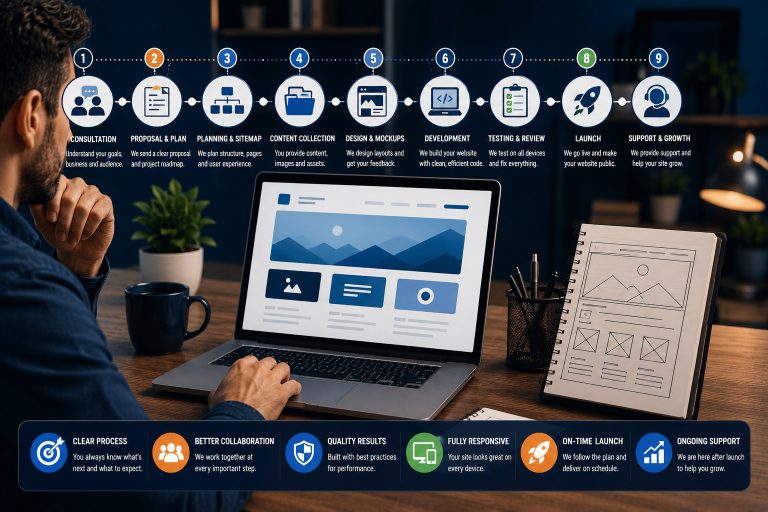
Step-by-Step: How to Prepare for a Website Redesign
- Review your current website. List what is working, what is outdated, and what frustrates visitors or your team.
- Clarify your business goals. Decide whether the redesign should improve leads, sales, trust, SEO, speed, or content management.
- Audit your content. Identify pages to keep, update, merge, delete, or create.
- Map your customer journey. Decide how visitors should move from homepage to service page, trust content, and contact or booking action.
- Plan your SEO structure. Review URLs, headings, keywords, metadata, internal links, and important pages before making changes.
- Prepare brand assets. Gather logo files, colors, fonts, images, service descriptions, testimonials, and policies.
- Create wireframes or page outlines. Plan structure before designing the final look.
- Build and test carefully. Review the website across devices and test all important actions before launch.
- Monitor after launch. Check traffic, forms, rankings, speed, and user behavior after the redesign goes live.
How to Think About Website Redesign Budget
The cost of a professional website redesign depends on the size of the website, platform, content needs, design complexity, integrations, SEO requirements, and whether the project includes copywriting, speed optimization, booking systems, e-commerce, membership features, or learning platform connections.
Instead of choosing the cheapest option, think about the business value. A redesign that improves trust, lead quality, conversion flow, and content management can be more valuable than a low-cost visual update that does not solve the real problems.
Factors that can affect redesign cost
- Number of pages
- Amount of content rewriting needed
- Custom design requirements
- SEO migration and technical cleanup
- Forms, bookings, payments, or CRM integrations
- Website platform and hosting setup
- Performance optimization
- Post-launch support and training
Final Verdict: When a Professional Website Redesign Is Worth It
A professional website redesign is worth it when your current website no longer represents your business clearly, does not support your growth goals, performs poorly on mobile, loads slowly, lacks trust, or fails to convert visitors into meaningful business opportunities.
If your website only needs small visual updates, a refresh may be enough. But if the structure, content, user experience, SEO foundation, and conversion path are weak, a strategic redesign is usually the better choice.
Need Help Planning a Strategic Website Redesign?
Teemikemedia Agency can help you review your current website, improve your brand presentation, rebuild key pages, strengthen your SEO structure, and create a professional website that supports your business goals.
FAQs About Professional Website Redesign
What is a professional website redesign?
A professional website redesign is a strategic improvement of your website’s structure, visuals, content, user experience, performance, and conversion flow. It is not just a visual makeover.
How do I know if my business needs a website redesign?
Your business may need a redesign if your website looks outdated, performs poorly on mobile, loads slowly, does not explain your offers clearly, or fails to generate leads or sales.
How often should a business redesign its website?
There is no fixed timeline for every business. Many websites need a major review every few years, but the right time depends on business changes, performance issues, user experience, and growth goals.
Is a website redesign the same as a website refresh?
No. A refresh usually updates surface-level design elements, while a redesign can involve deeper changes to structure, content, user journey, SEO, and conversion strategy.
Will a website redesign improve SEO?
A redesign can improve SEO if it includes better content structure, technical cleanup, internal linking, mobile usability, metadata, and page performance. However, SEO must be planned carefully during the redesign.
Can a redesign hurt my search rankings?
Yes, it can hurt rankings if important pages are deleted, URLs change without redirects, content is removed carelessly, or technical SEO is ignored. A redesign should include an SEO migration plan.
Should I redesign my website if it still looks okay?
Maybe. If the website looks acceptable but does not support your business goals, fails to convert, or is difficult to update, a strategic redesign may still be useful.
What should I prepare before redesigning my website?
Prepare your business goals, service descriptions, brand assets, current website issues, important pages, target audience details, testimonials, FAQs, and any required integrations.
Do small businesses need professional website redesign services?
Small businesses can benefit from professional redesign services when their website affects trust, leads, sales, bookings, or customer communication. A strong website can make a small business look more credible and easier to contact.
How long does a website redesign take?
The timeline depends on the website size, content needs, approval process, platform, integrations, and complexity. A small redesign may take less time than a larger website with many pages and custom features.
What pages should be reviewed during a redesign?
Start with the homepage, service pages, about page, contact page, landing pages, pricing pages, blog structure, FAQs, and any page that receives traffic or supports conversions.
Can I keep my existing website content during a redesign?
Yes, but it should be reviewed first. Some content may be kept, rewritten, merged, expanded, or removed depending on your goals and the quality of the existing pages.
What is the biggest mistake businesses make during redesigns?
The biggest mistake is focusing only on appearance while ignoring strategy, content, SEO, mobile usability, and conversion paths.
What should I do after launching a redesigned website?
After launch, test forms and links, monitor website traffic, check search visibility, review page speed, collect user feedback, and keep improving important pages over time.